
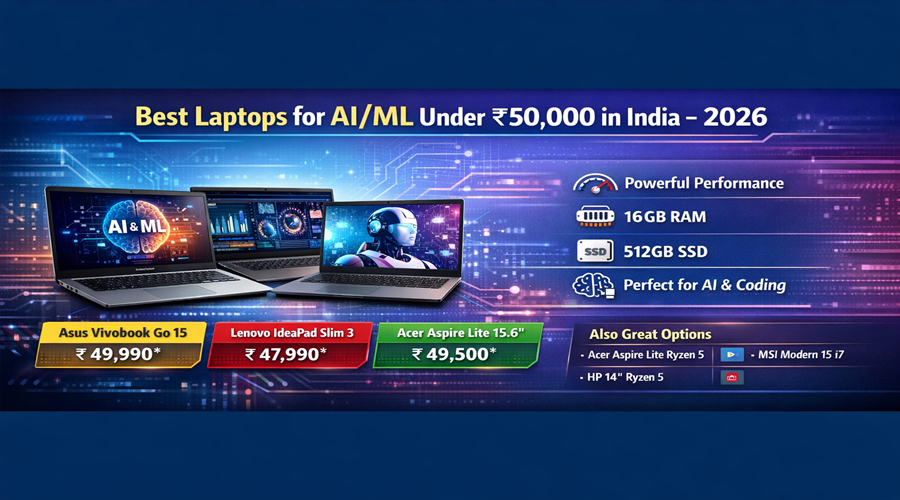
Best Laptops in 2026, AI and Machine Learning (ML) are no longer buzzwords — they’re essential skills for students, developers, and tech enthusiasts across India. Whether you’re running Python scripts, training small models in Jupyter Notebook, or using AI tools for data science coursework, choosing the right laptop is critical — especially on a budget.
But under ₹50,000, you won’t find high-end GPUs or premium chips capable of heavy training. Instead, your focus should be on efficient CPUs, generous RAM, fast storage (SSD), and good thermal performance — all of which ensure smooth coding, multitasking, and can handle light ML workflows without lag.
This guide breaks down everything you need to know — hardware fundamentals, usage scenarios, top laptop picks, purchasing tips, and future-proofing advice — all in simple terms.
Table of Contents
What to Expect from a ₹50,000 Laptop in 2026
Before diving into specific models, let’s set expectations:
What You Can Do
✔ Efficient coding (Python, R, Java)
✔ Running notebooks (Jupyter, Colab)
✔ Light ML model training (small datasets)
✔ Data preprocessing and visualization
✔ Web development and AI APIs
What You Probably Can’t Do Well
✘ Training large deep learning models locally
✘ GPU-intensive workloads (no discrete GPU)
✘ Long neural network training without cloud/GPU clusters
For true serious AI/ML training (LLMs, deep learning), you’ll ideally want a machine with a dedicated GPU or use cloud resources (like Colab, AWS, or Paperspace). But for learning fundamentals, prototyping, and coursework — a good ₹50k laptop goes a long way.
Key Hardware You Should Focus On
Let’s break down what really matters for AI/ML workflows:
1. Processor (CPU)
The CPU powers your code, model compilation, and data preprocessing.
- Aim for multi-core CPUs like AMD Ryzen 5 or Intel 12th/13th Gen i5.
- Ryzen chips often excel in multi-thread tasks (useful in data science).
2. RAM
AI and data tasks are memory-hungry.
- 16 GB RAM is ideal — keeps notebooks responsive even with larger datasets.
- If a laptop comes with 8 GB but offers easy upgrade paths, that’s still acceptable.
3. Storage (SSD)
SSD (NVMe preferred) = faster boot, quicker IDE loading, smoother performance.
- 512 GB SSD is a good baseline — gives space for OS, apps, datasets.
4. Display & Build Quality
- A 15.6″ Full HD display (1920×1080) makes coding comfortable.
- Lightweight build and good battery life help if you’re always on the move.
Top Budget Laptops for AI/ML Under ₹50,000 in 2026
Here are carefully selected laptops that balance performance, specs, durability, and long-term value.

Asus Vivobook Go 15


Lenovo IdeaPad Slim 3 (Ryzen 5)

DELL Inspiron 14

HP 15.6″ Ryzen 5

Lenovo IdeaPad Slim 3 (i3)

ASUS Vivobook 15
1. Asus Vivobook Go 15 — Best All-Round Value
- Why this stands out: Excellent combination of CPU performance, RAM, and SSD for under ₹50k.
- Processor: AMD Ryzen-series (multi-core)
- RAM: Usually 16 GB (great for multitasking)
- Storage: 512 GB SSD
- Best for: Python coding, data science tools, light ML workloads
This Vivobook model delivers one of the best CPUs in this price bracket and generous RAM that keeps notebook sessions responsive.
2. Lenovo IdeaPad Slim 3 (Ryzen 5) — Balanced Performance
- CPU: AMD Ryzen 5 (great for multi-thread tasks)
- RAM: 8 GB (upgradeable)
- Storage: 512 GB SSD
- Why: Good real-world performance in tasks like data preprocessing and IDE usage.
It’s a well-rounded laptop that’s often priced under ₹40k–₹45k, offering plenty of power for students and programmers.
3. DELL Inspiron 14 — Compact & Reliable
- CPU: Intel Core i3 13th Gen
- Storage: 512 GB SSD
- Why: Trusted Dell build quality and excellent support make it a reliable daily driver for coding tasks.
While the CPU isn’t as powerful as Ryzen 5, this model is solid for everyday productivity, student projects, and cloud-based AI workflows.
4. HP 15.6″ Ryzen 5 — Great Budget Choice
- CPU: AMD Ryzen 5 (strong performance for the price)
- Storage: SSD
- Why: Great balance between performance and usability — ideal for students.
This HP 15.6″ Ryzen 5 option often appears as a recommended choice under ₹50k due to its multi-core processing power.
5. Lenovo IdeaPad Slim 3 (i3) — Good Starter Laptop
- CPU: Intel i3 13th Gen
- Storage: 512 GB SSD
- Why: Excellent entry-level machine for coding and productivity; lightweight and affordable.
Great if you want a reliable machine that’s easy to carry and efficient for coursework.
6. ASUS Vivobook 15 — Affordable Everyday Laptop
- CPU: Intel Core i3 (13th Gen)
- Storage: SSD
- Why: Very budget-friendly choice — perfect if you’re starting out or prioritising portability.
Best suited for programming, web dev, and light datasets.
How to Choose the Right Laptop for AI/ML
With multiple options under ₹50,000, it’s important to match the laptop to your specific needs. Here’s how to decide:
1. For Students & Beginners
- Choose a laptop with 16 GB RAM or upgradeable slots.
- SSD is a must.
- Good battery life and a comfortable keyboard help long coding sessions.
Recommended: Vivobook Go 15, IdeaPad Slim 3 (Ryzen).
2. For Developers & Working Professionals
- Look for a multi-core CPU with higher clock speeds.
- A lightweight design makes daily carrying easier.
- Good after-sales service and reliable keyboard/trackpad
Recommended: Dell Inspiron 14, HP 15.6″ Ryzen 5.
3. For Laptops You Can Upgrade Later
- Some models let you upgrade RAM later — useful as models get heavier over time.
- Planning to use cloud GPU services for heavy training? Entry machines will still work fine.
Priorities: upgradeable RAM, SSD slots.
Tips to Maximize Performance on a Budget Laptop
Even the best ₹50,000 laptops have limitations. Here’s how to get the most out of yours:
Use Cloud Services for Heavy Tasks
If you’re training large models, you don’t need a powerful GPU locally. Use:
- Google Colab
- Kaggle Notebooks
- AWS + GCP Instances
This way, your laptop becomes a terminal for powerful hardware online.
Optimize Your Setup
- Keep your laptop cool with a cooling pad.
- Close unnecessary apps — more RAM for notebooks.
- Use light text editors (VS Code, JupyterLab efficiently).
Final Thoughts
Under ₹50,000, you won’t get laptops with dedicated GPUs capable of intensive ML training — but you can build a powerful setup for learning, experimentation, data prep, and even light training when you optimize your workflow.
For many students and beginners, a machine with a good CPU, 16 GB RAM, and 512 GB SSD provides a solid foundation for your AI & ML journey — and all the laptops above deliver excellent value for this price.
Read – Make Money Online from Home, Free 15 Best Ways to Earn
